# S-UI
**An Advanced Web Panel • Built on SagerNet/Sing-Box**



[](https://img.shields.io/github/downloads/alireza0/s-ui/total.svg)
[](https://www.gnu.org/licenses/gpl-3.0.en.html)
> **Disclaimer:** This project is only for personal learning and communication, please do not use it for illegal purposes, please do not use it in a production environment
**If you think this project is helpful to you, you may wish to give a**:star2:
[](https://www.buymeacoffee.com/alireza7)
- USDT (TRC20): `TYTq73Gj6dJ67qe58JVPD9zpjW2cc9XgVz`
## Quick Overview
| Features | Enable? |
| -------------------------------------- | :----------------: |
| Multi-Protocol | :heavy_check_mark: |
| Multi-Language | :heavy_check_mark: |
| Multi-Client/Inbound | :heavy_check_mark: |
| Advanced Traffic Routing Interface | :heavy_check_mark: |
| Client & Traffic & System Status | :heavy_check_mark: |
| Subscription Service (link/json + info)| :heavy_check_mark: |
| Dark/Light Theme | :heavy_check_mark: |
## Default Installation Informarion
- Panel Port: 2095
- Panel Path: /app/
- Subscription Port: 2096
- Subscription Path: /sub/
- User/Passowrd: admin
## Install & Upgrade to Latest Version
```sh
bash <(curl -Ls https://raw.githubusercontent.com/alireza0/s-ui/master/install.sh)
```
## Install Custom Version
**Step 1:** To install your desired version, add the version to the end of the installation command. e.g., ver `0.0.1`:
```sh
bash <(curl -Ls https://raw.githubusercontent.com/alireza0/s-ui/master/install.sh) 0.0.1
```
## Uninstall S-UI
```sh
systemctl disable sing-box --now
systemctl disable s-ui --now
rm -f /etc/systemd/system/s-ui.service
rm -f /etc/systemd/system/sing-box.service
systemctl daemon-reload
rm -fr /usr/local/s-ui
```
## Install using Docker
Click for details
### Usage
**Step 1:** Install Docker
```shell
curl -fsSL https://get.docker.com | sh
```
**Step 2:** Install S-UI
> Docker compose method
```shell
mkdir s-ui && cd s-ui
wget -q https://raw.githubusercontent.com/alireza0/s-ui/refs/tags/1.0.0/docker-compose.yml
docker compose up -d
```
> Use docker for s-ui only
```shell
mkdir s-ui && cd s-ui
docker run -itd \
-p 2095:2095 -p 2096:2096 -p 443:443 -p 80:80 \
-v $PWD/db/:/usr/local/s-ui/db/ \
-v $PWD/cert/:/root/cert/ \
--name s-ui --restart=unless-stopped \
alireza7/s-ui:latest
```
> Build your own image
```shell
docker build -t s-ui .
```
## Manual run + contribution
Click for details
### Build and run whole project
```shell
./runSUI.sh
```
### - Frontend
Frontend codes are in `frontend` folder in the root of repository.
To run it localy for instant developement you can use (apply automatic changes on file save):
```shell
cd frontend
npm run dev
```
> By this command it will run a `vite` web server on separate port `3000`, with backend proxy to `http://localhost:2095`. You can change it in `frontend/vite.config.mts`.
To build fronend:
```shell
cd frontend
npm run build
```
### - Backend
Backend codes are in `backend` folder in the root of repository.
> Please build fronend once before!
To build backend:
```shell
cd backend
# remove old frontend compiled files
rm -fr web/html/*
# apply new frontend compiled files
cp -R ../frontend/dist/ web/html/
# build
go build -o ../sui main.go
```
To run backend (from root folder of repository):
```shell
./sui
```
## Languages
- English
- Farsi
- Vietnamese
- Chinese (Simplified)
- Chinese (Traditional)
- Russian
## Features
- Supported protocols:
- General: Mixed, SOCKS, HTTP, HTTPS, Direct, Redirect, TProxy
- V2Ray based: VLESS, VMess, Trojan, Shadowsocks
- Other protocols: ShadowTLS, Hysteria, Hysteri2, Naive, TUIC
- Supports XTLS protocols
- An advanced interface for routing traffic, incorporating PROXY Protocol, External, and Transparent Proxy, SSL Certificate, and Port
- An advanced interface for inbound and outbound configuration
- Clients’ traffic cap and expiration date
- Displays online clients, inbounds and outbounds with traffic statistics, and system status monitoring
- Subscription service with ability to add external links and subscription
- HTTPS for secure access to the web panel and subscription service (self-provided domain + SSL certificate)
- Dark/Light theme
## Recommended OS
- Ubuntu 20.04+
- Debian 11+
- CentOS 8+
- Fedora 36+
- Arch Linux
- Parch Linux
- Manjaro
- Armbian
- AlmaLinux 9+
- Rocky Linux 9+
- Oracle Linux 8+
- OpenSUSE Tubleweed
## Environment Variables
Click for details
### Usage
| Variable | Type | Default |
| -------------- | :--------------------------------------------: | :------------ |
| SUI_LOG_LEVEL | `"debug"` \| `"info"` \| `"warn"` \| `"error"` | `"info"` |
| SUI_DEBUG | `boolean` | `false` |
| SUI_BIN_FOLDER | `string` | `"bin"` |
| SUI_DB_FOLDER | `string` | `"db"` |
| SINGBOX_API | `string` | - |
## SSL Certificate
Click for details
### Certbot
```bash
snap install core; snap refresh core
snap install --classic certbot
ln -s /snap/bin/certbot /usr/bin/certbot
certbot certonly --standalone --register-unsafely-without-email --non-interactive --agree-tos -d
```
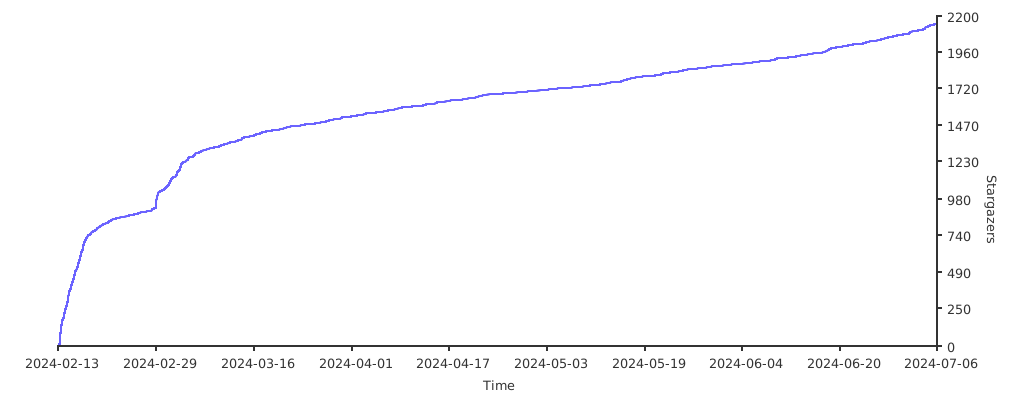
## Stargazers over Time
[](https://starchart.cc/alireza0/s-ui)